Subway Custom Orders
Subway Secret Menu: 12 Hacks & How to Order
Build practical Subway combinations from listed breads, proteins, cheeses, vegetables, sauces, seasonings, and toasted options. Availability and charges vary by restaurant.
Name the base item and each change instead of relying on a nickname.
Base + changes
Main ordering method
12 builds
Practical combinations
Counter or app
Best ordering channels
Review extras
Check the final charge
Subway secret menu names are informal. Start with a product shown for the selected restaurant, describe only the supported changes, and accept the standard item if an ingredient or preparation method is unavailable.
Quick Answer: How the Subway Secret Menu Works
The Subway secret menu is best understood as a collection of custom orders, not a hidden list that every employee is trained to recognize. Choose a base from the official Subway menu, then ask for available changes one at a time. A clear request such as “turkey with bacon, provolone, lettuce, and tomato” works better than a nickname pulled from social media.
Begin with the bread, size, sandwich, wrap, salad, bowl, or pizza shown by the selected restaurant. Then choose the protein, cheese, vegetables, sauce, seasonings, and heating option that the ordering channel allows. Our Subway menu overview helps you identify a sensible base before you customize. The employee may decline ingredients that are unavailable, cannot be transferred between products, or do not fit the restaurant’s preparation rules.
For more custom-order ideas across restaurants, browse the Secret Menus collection. Subway stands apart because its normal ordering process already invites ingredient choices. The safest “hack” is therefore a short, repeatable build made from visible options, with the final price and allergen details confirmed before preparation.
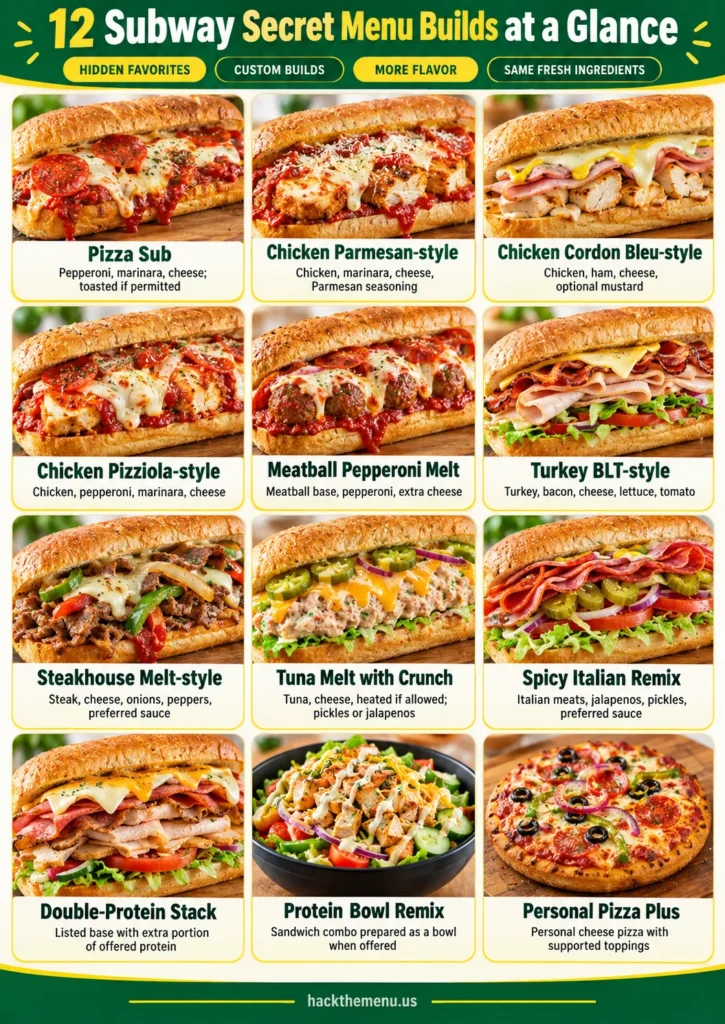
12 Subway Secret Menu Builds at a Glance
These builds use ingredient-first instructions so the request remains understandable even when a viral name is unfamiliar. Each one begins with a listed base or a category the restaurant offers. Ingredient names can differ across menus, and not every location carries every protein, sauce, cheese, bread, bowl, or pizza.
Read the order column as a sequence, not a promise. Ask whether the essential ingredients are available, then remove any optional element that the restaurant cannot support. When a build combines multiple proteins or premium add-ons, expect the total to increase.
| Build | Plain-language order | Key check | Best method |
|---|---|---|---|
| Pizza Sub | Pepperoni, marinara, and cheese on an offered bread; toasted if permitted | Pepperoni and marinara availability | Counter |
| Chicken Parmesan-style | Available chicken, marinara, cheese, and Parmesan seasoning | Chicken base and heating rules | Counter |
| Chicken Cordon Bleu-style | Chicken, ham, cheese, and optional mustard | Ham as an add-on | Counter |
| Chicken Pizziola-style | Chicken, pepperoni, marinara, and cheese | Two proteins and sauce transfer | Counter |
| Meatball Pepperoni Melt | Meatball base with pepperoni and extra cheese | Pepperoni charge and toasting | Counter or app |
| Turkey BLT-style | Turkey, bacon, cheese, lettuce, and tomato | Bacon add-on charge | Counter or app |
| Steakhouse Melt-style | Steak, cheese, onions, peppers, and preferred sauce | Vegetables offered by the restaurant | Counter or app |
| Tuna Melt with Crunch | Tuna and cheese, heated if allowed, then pickles or jalapeños | Heating and cold topping order | Counter |
| Spicy Italian Remix | Italian meat base with jalapeños, pickles, and preferred sauce | Heat level and sauce amount | Counter or app |
| Double-Protein Stack | Any listed base with an extra portion of an offered protein | Portion and add-on price | Counter or app |
| Protein Bowl Remix | A listed sandwich combination prepared as a bowl when that format appears | Digital bowl eligibility | App or counter |
| Personal Pizza Plus | Personal cheese pizza with supported pepperoni, bacon, vegetables, or seasoning | Pizza offered by the restaurant | Counter or app |
The Pizza Sub, chicken combinations, and meatball variations need the most confirmation because marinara, pepperoni, and heating rules may differ. Turkey, tuna, steak, and Italian-style changes are often easier when the base item already appears in the ordering channel. A bowl or personal pizza should be requested only when that format is displayed for the restaurant.
These are custom combinations rather than fixed-value promotions. If timing affects your visit, review the separate Subway happy hour information before ordering. Keep the build simple enough to repeat, and use the displayed total rather than an online price from another restaurant.
Does Subway Have a Hidden Menu?
There is no dependable nationwide list of hidden Subway products that employees must know by name. Most online lists mix ordinary customizations, discontinued sandwiches, historical preparation methods, local options, and fan-created combinations. That mixture is why one person may receive the requested build while another restaurant cannot make it.
The practical definition is narrower: a secret-menu item is a listed base adjusted with ingredients that the restaurant already offers. This is similar to the ingredient-first approach used for the Burger King secret menu, but Subway provides more visible choice during the normal assembly process. The nickname is optional; the base and changes are what matter.
Do not argue that a combination exists because a video or article named it. The employee sees the restaurant’s product buttons, available portions, food-safety procedures, and equipment limits. If the request cannot be entered or prepared, choose the closest listed sandwich and keep the unavailable ingredient out.
Pizza Sub and Marinara Builds
For a Pizza Sub, ask whether pepperoni and marinara can be added to your preferred bread. Choose an offered cheese, request toasting if permitted, and add vegetables or seasonings after the essential ingredients are confirmed. The request should sound like an ingredient list, not a test of whether the employee recognizes “Pizza Sub.”
Pizza Sub order script
Try: “Could I have pepperoni with marinara and provolone on this bread, toasted if that preparation is allowed?” If provolone is not offered, choose another cheese displayed on the line. If marinara cannot be added to that bread, consider a meatball base or a personal pizza instead of pushing for an exception.
Personal Pizza Plus
Some restaurants display a personal cheese pizza that can accept supported meat, vegetable, and seasoning choices. Add only the toppings shown for that product, then review the total. If you enjoy ingredient-led pizza customizations, the Domino’s secret menu ideas use the same plain-order principle. Product range still belongs to the selected restaurant.
Chicken Parmesan, Cordon Bleu, and Pizziola-style Subs
Three popular names begin with an available chicken base but move in different directions. Chicken Parmesan-style uses marinara and cheese. Chicken Cordon Bleu-style adds ham and cheese, with mustard as an optional accent. Chicken Pizziola-style combines chicken with pepperoni, marinara, and cheese.
Chicken Parmesan-style order
Ask for an available chicken sandwich with marinara, a suitable cheese, and Parmesan seasoning if offered. Request toasting only after the employee confirms that the complete sandwich can be heated. The name describes the flavor direction; it does not mean the restaurant carries breaded chicken or prepares a traditional plated dish.
Chicken Cordon Bleu-style order
Start with chicken, then ask whether ham and cheese can be added. Mustard can supply a sharper finish without making the request complicated. For another chicken-focused customization format, compare the direct ordering language in our Chick-fil-A secret menu. At Subway, the chicken and ham portions remain separate chargeable components when the register treats them that way.
Chicken Pizziola-style order
Request chicken with pepperoni, marinara, and cheese. This is the most complex of the three because it crosses proteins and may require a sauce that is attached to another product. If the register or preparation line cannot support the combination, remove pepperoni or choose the simpler Pizza Sub or Chicken Parmesan-style build.
Meatball and Pepperoni Customizations
A meatball base already places marinara at the center of the order, so it can reduce the number of changes. To make a Meatball Pepperoni Melt, ask whether pepperoni and an extra or alternate cheese can be added. Choose toasting only if the restaurant allows that preparation for the selected bread and portion.
Keep sauce volume in mind. Meatballs and marinara can make a heavily filled sandwich difficult to close, and extra cheese or vegetables add more bulk. Ask for a manageable amount rather than requesting every available topping. If the employee recommends placing a topping after heating, follow that workflow.
This build is more predictable than a multi-sandwich stack because it stays on one base. The same principle appears in our McDonald’s secret menu explanations: standard product names are more useful than online shorthand. At Subway, say “meatball with pepperoni and cheese” and confirm the pepperoni charge.
Turkey, Bacon, and Deli-style Builds
A Turkey BLT-style sub is a straightforward way to turn a familiar base into a more substantial order. Start with turkey, add bacon if it is offered, choose cheese, then select lettuce, tomato, and a sauce. The “BLT-style” label is only a quick description; the employee needs the actual ingredients.
Ham can be used in the same way when it appears as a base or supported add-on. A turkey-and-ham combination is easier to explain than a dramatic meat-stack nickname, and it gives the employee a clear portion path. Add vegetables after the proteins and cheese are settled so the essential choices do not get lost.
Avoid assuming that bacon, avocado, or a second deli portion is included in the base price. Review each addition before payment. For another burger-chain example of a concise bacon modification, see the Wendy’s secret menu. The ordering lesson is the same even though Subway assembles the sandwich in front of you.
Tuna Melt and Spicy Italian Remixes
For a Tuna Melt with Crunch, begin with tuna and cheese. Ask whether the sandwich can be heated in the form you selected, then add pickles, jalapeños, onions, or another crisp vegetable after heating when the employee recommends it. This order works because the contrast comes from ordinary topping choices rather than an obscure product name.
A Spicy Italian Remix begins with the Italian-style meat base shown on the menu. Add jalapeños and pickles, then choose one sauce in a controlled amount. Too many hot or acidic toppings can hide the base flavor and make the sandwich wetter, so build around one heat level instead of selecting every spicy option.
Both combinations are easy to scale back. If heating is not available, keep the tuna sandwich cold. If a particular Italian base is absent, select another listed deli sandwich and reproduce only the vegetables and sauce profile. The aim is a repeatable order, not a perfect recreation of a social-media recipe.
Steakhouse Melt and Double-Protein Options
A Steakhouse Melt-style sub starts with steak, an offered cheese, onions, peppers, and a sauce that suits the combination. Do not include mushrooms unless the selected restaurant actually displays them. Ask for the steak-and-cheese base first, then make the vegetable and sauce choices through the normal assembly sequence.
A Double-Protein Stack is simpler in concept but more important to price carefully. Choose any listed sandwich and ask for an extra portion of a protein that the restaurant permits on that base. “Double protein” does not always mean two identical scoops, and portion rules can differ by product, so let the register define the available amount.
Large builds can be harder to close, toast, and eat. Keep vegetables and sauces restrained, accept a bowl when it is a supported option, or order the extra protein separately if the restaurant requires it. A bigger order is not automatically a better value; compare the displayed total with a standard footlong, bowl, or second item.
Vegetarian, Salad, and Protein Bowl Options
A vegetarian custom order should start with a vegetarian base shown for the restaurant, not with an assumption that every vegetable or plant-based protein is stocked. Choose bread, wrap, salad, or bowl format; add cheese if desired; then select vegetables, sauce, and seasoning. Ask whether any premium vegetable or spread adds a charge.
For a Protein Bowl Remix, first identify a sandwich whose ingredients you want, then see whether the ordering channel offers that combination as a bowl. Some products transfer cleanly while others do not appear in the bowl category. If the format is missing, choose a listed bowl rather than asking staff to improvise a product the register cannot support.
Bowls and salads make sauces and portion sizes especially visible, so begin with less dressing and add more only if needed. The modular approach resembles the customization logic described in our Chipotle secret menu. Subway’s eligible bases and portions still follow its own restaurant menu and preparation rules.
How to Order in the Subway App
Select the restaurant before building the order because digital choices are tied to that location. Open a base item, check the size or format, then review bread, protein, cheese, vegetables, sauces, seasonings, extras, and heating options. If the essential ingredient does not appear, do not assume a free-text note will override the menu.
- Choose a base that already contains the hardest-to-add ingredient, such as meatballs with marinara.
- Add one major extra at a time and watch the displayed total change.
- Use only selectable modifiers for proteins, cheeses, vegetables, sauces, and seasonings.
- Review quantity, heating choice, restaurant, pickup method, and final price before payment.
- For a complex cross-protein build, switch to the counter or simplify the combination.
The app is strongest for clear modifications attached to one product. Use our Subway menu page to compare categories before opening the ordering channel. An app total is more useful than a price quoted elsewhere because it reflects the selected restaurant and the exact extras accepted by the digital menu.
How to Order at the Counter
At the counter, lead with the standard base and pause for each stage of assembly. State the bread or format, size, base protein, and any extra protein before moving to cheese and heating. After that, select vegetables, sauce, and seasoning. This sequence fits the work happening on the line and reduces corrections.
A clear counter script
Try: “I’d like this bread with the listed chicken base. Can you add pepperoni, marinara, and provolone, and toast it if that combination is allowed? Please tell me the extra charge first.” The sentence identifies the base, additions, preparation request, and price question without expecting nickname recognition.
If the employee says an ingredient cannot be transferred or the sandwich cannot be toasted, remove that step and continue politely. The same low-confusion method works for highly customized orders on the Taco Bell secret menu. A successful custom order respects the restaurant’s workflow rather than treating flexibility as an unlimited promise.
Extra Charges, Portions, and Value
A secret-menu nickname does not create a bundled price. Extra meat, bacon, avocado, premium cheese, double portions, and certain substitutions can raise the total. A two-product combination costs both products unless the restaurant offers a specific modifier. Delivery pricing and service fees can also change the amount paid.
Ask for the charge before the ingredient is added, or watch the app total after each selection. If the build becomes expensive, compare it with a larger standard sandwich, a listed bowl, or a meal. Removing one premium extra often preserves the main flavor idea while making the order easier to prepare and price.
Value depends on the selected restaurant and the choices in the order, not on a viral claim. Our Dunkin’ secret menu uses the same caution for add-ins and substitutions. Confirm what is included, what counts as an extra, and whether a smaller modification delivers the result you actually want.
Availability and Restaurant Limits
Subway restaurants can differ in product range, bread, proteins, cheeses, vegetables, sauces, personal pizzas, bowls, breakfast choices, equipment, and register setup. A combination that works at one restaurant may be incomplete at another. Availability can also change within the operating period when a prepared ingredient runs out.
Use the selected restaurant’s menu as the first filter. At the counter, ask a short availability question before reciting the full build. In the app, missing modifiers usually mean the digital order cannot support that version. Choose the closest listed base rather than forcing an ingredient from an unrelated product.
Preparation limits matter too. Staff may decline a bread cut, a heavily overfilled sandwich, an unsupported heating sequence, or a cross-product transfer. These boundaries protect portion consistency, food handling, and order accuracy. A useful backup order should remove one difficult element while keeping the main protein, cheese, or sauce profile.
Nutrition, Ingredients, and Allergen Considerations
Use Subway’s official nutrition and allergen information for standard components. A custom build may not have one published total, so review the base, added protein, cheese, sauce, bread or bowl, and any premium topping separately. Double portions and combined proteins can change calories, sodium, saturated fat, and other values substantially.
Tell the employee about an allergy before preparation begins. Subway explains that shared preparation areas and equipment can create cross-contact risk, so removing a visible ingredient does not guarantee the absence of an allergen. A complex build can increase the number of components involved and make careful communication more important.
Sauces, cheese, bread, processed meats, meatballs, tuna, and seasonings may introduce allergens or dietary concerns that the nickname does not reveal. Use plain ingredient names and ask a qualified medical professional for personal dietary advice. For another example of why custom drink names can obscure ingredients, see the Starbucks secret menu. Ingredient transparency matters more than recreating a trend.
Viral Names That Create Confusion
The Feast, Carnivore, Meat Lover, Wing Effect, and Old Cut appear in online secret-menu lists, but the names do not provide a reliable recipe or register path. Descriptions often conflict, and some refer to historical products or preparation styles. Treat them as conversation labels, not as instructions an employee should recognize.
The Feast, Carnivore, and Meat Lover
These names generally describe a sandwich with several deli meats or extra protein. Instead of using the nickname, choose one listed base and specify one additional meat at a time. Confirm the portion and charge. If the sandwich becomes too bulky, use fewer vegetables and sauces or accept separate components.
Wing Effect and Old Cut
These phrases usually concern the way bread is cut or folded. Modern restaurant procedures may use a standard cut, and employees may never have encountered the old term. Focus on the filling and allow the employee to prepare the bread according to the restaurant’s method. A special cut is not necessary for the flavor of the build.
Common Subway Custom-Order Mistakes
- Opening with a viral nickname instead of a listed sandwich and specific changes.
- Assuming every restaurant carries personal pizza, breakfast, every bread, or every sauce.
- Requesting several premium proteins without asking how portions and charges work.
- Using an order note for an ingredient that does not appear as a digital modifier.
- Asking for a historical bread cut or preparation method as though it were guaranteed.
- Adding so many wet toppings that the sandwich becomes difficult to close and eat.
- Waiting until preparation begins to mention a food allergy or dietary restriction.
The fix is a three-part order: name the base, state the essential changes, and confirm the charge. Keep one backup version in mind in case an ingredient or preparation step is unavailable. This makes the interaction faster and gives you a result that can be repeated without depending on a trend name.
Subway Secret Menu FAQs
These answers focus on repeatable ordering language, restaurant limits, and ingredient awareness. Open any question for the concise answer.
Does Subway have an official secret menu?
Subway does not present a separate nationwide secret-menu category. The useful idea behind the phrase is customization: choose a listed sandwich, wrap, bowl, salad, or pizza where offered, then select supported proteins, cheeses, vegetables, sauces, seasonings, and toasting options. A nickname is never a guarantee that the restaurant can make the build.
What is the easiest Subway secret menu item to order?
A turkey BLT-style sub is one of the simplest because the request is easy to explain: begin with turkey, add bacon if offered, choose cheese, then add lettuce and tomato. The Pizza Sub is also simple when pepperoni and marinara are available. Confirm every ingredient and extra charge before paying.
Can I order a Pizza Sub at Subway?
Ask whether the restaurant has pepperoni, marinara, your preferred cheese, and a bread that can be toasted. If all four are offered, request them by ingredient instead of asking only for a Pizza Sub. Some restaurants may offer a personal pizza, which can be a clearer base for supported toppings.
How do I order a Chicken Parmesan-style sub?
Choose an available chicken base, ask for marinara, add provolone or another offered cheese, and request Parmesan seasoning if available. Ask for it toasted only if the restaurant permits the complete combination to be heated. This is a customization, not a guaranteed named product.
Can Subway make a Chicken Cordon Bleu-style sub?
It may be possible when chicken, ham, and a suitable cheese are offered. Ask for those ingredients on your chosen bread and request toasting if supported. Mustard can add the familiar sharp note, but it is optional. Availability and add-on charges depend on the restaurant.
Can I order Subway secret menu items in the app?
Use the app when every required choice appears under the selected base item. Digital menus can restrict cross-item ingredients, double portions, sauces, or heating instructions. If one essential option is missing, place a simpler order or ask at the counter rather than hiding the request in an order note.
Do Subway custom orders cost extra?
They can. Extra meat, bacon, avocado, premium cheese, added portions, and some substitutions may increase the total. A build made from two separate products costs both listed prices. Review the displayed total or ask the employee to confirm charges before the order is prepared.
What does the Old Cut mean at Subway?
The term usually refers to a historical way of cutting bread from the top to form a channel. It is a preparation request, not a separate sandwich. Many employees may not know the phrase or may use the restaurant’s standard bread cut, so it is better to accept the normal preparation method.
What is the Wing Effect at Subway?
Online descriptions use the name for bread with side flaps or a specific cut and topping arrangement. The term is not a dependable ordering instruction. Explain the ingredients you want and let the employee prepare the bread with the restaurant’s approved method.
How should I handle food allergies with a custom Subway order?
Tell the employee about the allergy before preparation and review Subway’s official allergen and ingredient information. Custom combinations can bring together several ingredients, and shared preparation areas create cross-contact risk. Do not rely on a viral recipe name to communicate a medical requirement.
Ordering Notes
Subway custom orders work best when they stay close to a product the restaurant already sells. Use the menu for the selected restaurant, explain changes with ordinary ingredient names, and confirm premiums before preparation. If a build requires a missing modifier, choose the nearest listed option or remove the difficult step.
This site is independent and is not affiliated with or endorsed by Subway. Menu items, portions, ingredients, preparation options, prices, and participation vary by restaurant. For allergies or dietary restrictions, speak with restaurant staff and use Subway’s own ingredient and allergen information before ordering.