Sheetz Secret Menu: 10 MTO Hacks & How to Order
SHEETZ USA • SECRET MENU
Sheetz Secret Menu: 10 MTO Hacks & How to Order
Sheetz does not publish a separate nationwide secret menu. Its Made-To-Order kitchen does invite customers to combine familiar menu items in unusual ways, from mozzarella-stick burgers to fries-topped salads.
These are unofficial build ideas using options Sheetz itself describes. The exact screen, ingredients, price, and availability can vary by store.
10
custom order ideas
MTO
made to order
24/7
customization focus
Varies
price by build & store
Quick answer: Sheetz secret-menu-style orders are custom MTO combinations, not a hidden menu with guaranteed item names. The company highlights a burger topped with mozzarella sticks, a chicken sandwich with mac and cheese bites, fries on salads, mini hash browns in breakfast burritos, and hot dogs served in pretzel buns. Use the kiosk or app to build the closest available version rather than asking staff for an unofficial nickname.
Does Sheetz Have a Secret Menu?
Sheetz does not advertise a separate, fixed secret-menu list. Instead, its official food information describes a highly customizable Made-To-Order menu and encourages customers to create combinations from standard items. The company says customers can build more than one million MTO food combinations, so many unusual orders are better understood as custom builds than secret products.
That distinction matters when ordering. A cashier or kitchen team may not recognize a nickname that circulates online, but the kiosk can send a clear ticket when each component is selected from the available menu. For standard categories, item details, and regular pricing, use the Sheetz menu and prices page.
The ideas below are grounded in Sheetz’s own examples and published customization categories. They are not promises that every location stocks every ingredient or that every combination appears as a one-tap preset. If you enjoy building your own order, compare the Sonic secret menu and Subway secret menu for other customization-led chains.
Sheetz Secret Menu: 10 MTO Hacks at a Glance
This table separates the custom build from its official menu foundation. Each suggestion uses a product or customization example Sheetz describes, but the exact build must be assembled from the options shown at the selected store. No fixed price is listed because add-ons, sizes, and local menus change the total.
| Custom build | Start with | What to request or select | Price |
|---|---|---|---|
| Big Mozz Burger | MTO burger | Add mozzarella sticks as a topping | Varies |
| Mac Bite Chicken Sandwich | MTO chicken sandwich | Add mac and cheese bites | Varies |
| Loaded Fry Salad | Salad | Add fries to the salad | Varies |
| Hash Brown Breakfast Burrito | Breakfast burrito | Add mini hash browns | Varies |
| Pretzel Bun Hot Dog | Hot dog | Choose a pretzel bun if listed | Varies |
| Build-Your-Own App Platter | App Sampler | Choose the available appetizer mix | Varies |
| Custom MTO Sub | MTO sub | Build with the available bread, fillings, toppings, and sauces | Varies |
| Six-Pack Taco Order | MTO tacos | Use the six-taco order format and choose available fillings | Varies |
| Cookie-Crunch Shake | Custom milkshake | Add cookie crumbles or listed flavor additions | Varies |
| Custom Coffee Build | Sheetz Bros. coffee drink | Choose a hot, iced, or frozen coffee style and available flavor options | Varies |
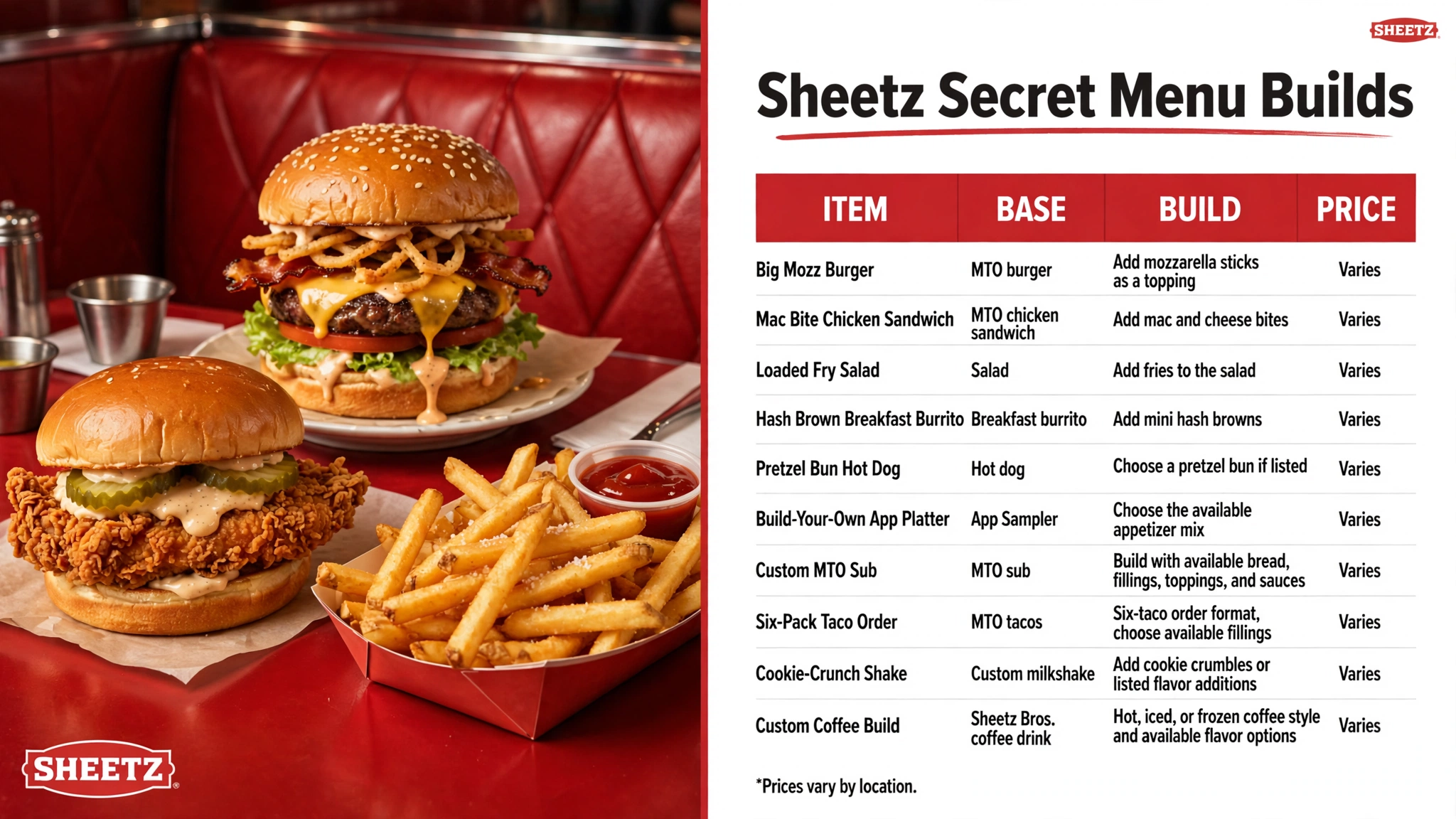
The first five builds mirror combinations Sheetz specifically uses to illustrate its MTO customization. The remaining ideas use the chain’s stated App Sampler, custom sub, taco, milkshake, and coffee categories. Check the final order screen because a local menu may not show every size, ingredient, or add-on.
8 Sheetz Food Hacks
1. Order the Big Mozz Burger
Sheetz itself uses the example of a burger topped with mozzarella sticks to show how far its MTO combinations can go. Start with the MTO burger on the kiosk, then add mozzarella sticks if they appear as an available side or add-on. The result is a burger with a crunchy, cheesy layer rather than a new item you need to ask the kitchen to recognize by name.
Check the burger’s existing toppings before adding extras so the finished order does not become unnecessarily complicated. If mozzarella sticks are not listed at that store, do not assume the kitchen can substitute another product. For more burger customization ideas, see the Burger King secret menu.
2. Add Mac and Cheese Bites to a Chicken Sandwich
Another Sheetz-published example pairs an MTO chicken sandwich with mac and cheese bites. Choose the chicken sandwich first, then add the bites through the available side or add-on menu. If the ordering screen allows the bites to be placed with the sandwich, use that option; otherwise, order them separately and assemble the combination yourself.
This build is best treated as a texture and comfort-food combination, not a standardized recipe. The restaurant may package the items separately, and availability can vary. Customers who like customized chicken orders can also browse the KFC secret menu.
3. Put Fries on Your Salad
Sheetz directly suggests adding fries to a salad as one of its MTO possibilities. Start with a salad that appears on the store’s menu, then add fries if the ordering interface offers them as an available side or topping. If the system does not support adding fries inside the salad ticket, order the two items separately and combine them after pickup.
Keep dressing and other toppings in mind because a hot, crispy addition can soften greens if the meal sits too long. This is a custom combination, not a nutrition recommendation. For another build-your-own salad approach, visit the Panera Bread secret menu.
4. Add Mini Hash Browns to a Breakfast Burrito
Sheetz highlights loading a breakfast burrito with mini hash browns. Choose a breakfast burrito from the MTO breakfast section and add mini hash browns if the kiosk lists them as a selectable ingredient or side. If the ingredient cannot be added within the burrito builder, order the hash browns separately and combine them yourself.
This idea adds a crisp potato layer to a handheld breakfast. It may make the burrito larger and messier, so check the size before adding more fillings. For another breakfast customization reference, see the Taco Bell secret menu.
5. Choose a Pretzel Bun for Your Hot Dog
Sheetz specifically calls out putting hot dogs into pretzel buns. Begin with a Hot Dogz order and select the pretzel bun when it appears among the available bun choices. Then finish the order with toppings offered by the store’s normal hot dog builder.
The bun choice is the main point of this hack, so there is no need to add a long list of special instructions. If a pretzel bun is not available in the selected store’s kiosk, choose one of the listed buns instead. Keep the order simple and use the available bun and toppings shown on the screen.
6. Build a Personal App Sampler
Sheetz invites customers to build a dream appetizer platter, and its official food page features an App Sampler category. Start with that sampler and review the available appetizer choices at your store. Select a mix that suits the group rather than assuming every location offers the same pieces or combinations.
This is a useful sharing order when one person wants a little of several snacks. If the screen offers a fixed sampler rather than individual substitutions, use the available configuration and add separate sides only when needed. The Buffalo Wild Wings secret menu offers another way to compare snack and wing customizations.
7. Make the MTO Sub Your Own
Sheetz describes its MTO sub as a customizable format, so the practical hack is to build the sandwich around the options the kiosk actually displays. Choose the bread and size first, then select a listed filling, cheese, vegetables, and sauce. This keeps the order readable for the kitchen and lets you see which extras change the total.
Do not rely on a nickname or a combination from another chain. Ingredient lists and available add-ons can change by store, and some choices may carry an additional charge. If you prefer a dedicated sub shop, compare the Jimmy John’s secret menu.
8. Use the Six-Taco Format for a Group
Sheetz’s official food page says customers can order a six-pack of tacos. Use that standard order format when feeding more than one person, then choose the available taco fillings or toppings shown on the screen. This is a practical customization because the base quantity is already part of the chain’s own MTO examples.
Check whether the selected store lets you vary the tacos individually or applies one build across the pack. If the screen does not offer separate selections, order the available configuration rather than assuming the kitchen can split it. For another customizable Tex-Mex menu, see the Chipotle secret menu.
2 Sheetz Drink Hacks
9. Turn a Custom Shake Into a Cookie-Crunch Treat
Sheetz’s drinks page describes customizable milkshakes and specifically mentions additions such as cookie crumbles and flavors. Start with a milkshake that appears on the local menu, then add cookie crumbles or another listed flavor option. The official menu also features named shakes such as Cookies & Cream and Peanut Butter Brownie, which can help you choose a starting point.
Keep the additions visible on the order ticket so the kitchen receives a clear build. If a topping is not shown, do not assume it is stocked at that location. The Dairy Queen secret menu has more frozen-dessert customization ideas.
10. Customize a Sheetz Bros. Coffee
Sheetz describes its coffee program as made to order and lists hot, iced, and frozen styles, including lattes, cappuccinos, cold brew, nitro cold brew, and hot mocha. Choose the base drink and temperature first, then select any flavors or additions that the local ordering screen offers. This gives you a personalized coffee without depending on a secret drink name.
For a sweeter drink, compare the listed specialty coffee options and any permitted flavor additions before checkout. For a cold, less milk-forward starting point, look at cold brew or nitro cold brew where available. Coffee fans can also compare the Dutch Bros secret menu and Dunkin’ secret menu.
Which Sheetz Custom Build Should You Try?
Use this comparison to choose a build based on the type of order you want. The first five ideas are directly illustrated by Sheetz, while the other five use categories and customization options described on its official food and drinks pages. The table is a planning aid, not a guarantee that every combination is available at every store.
| If you want | Try this build | Why it fits | Price |
|---|---|---|---|
| A hearty burger | Big Mozz Burger | Cheese sticks add a crisp, cheesy layer | Varies |
| A filling chicken sandwich | Mac Bite Chicken Sandwich | Combines two MTO favorites | Varies |
| A hot-and-cold contrast | Loaded Fry Salad | Adds warm fries to a salad | Varies |
| A bigger breakfast | Hash Brown Breakfast Burrito | Brings mini hash browns into the burrito | Varies |
| A snack to share | Personal App Sampler | Lets you choose from available appetizer options | Varies |
| A sweet drink | Cookie-Crunch Shake | Uses listed shake toppings and flavors | Varies |
If you are ordering for a group, the app platter or six-taco format is easier to divide than a heavily customized single sandwich. For one person, a burger, burrito, or shake is simpler to personalize. Review the full order summary before paying so every add-on is intentional.
How to Order Sheetz Secret-Menu-Style Builds
Most Sheetz custom builds are easiest to order through the MTO kiosk or app because those tools show the options the selected store can prepare. Start with a standard menu category, then add the requested ingredients using the available controls. If an item or topping does not appear, ask an employee whether it is available rather than assuming it can be made.
- Select the Sheetz location before building the order so the menu reflects that store.
- Choose the closest standard base, such as a burger, chicken sandwich, salad, breakfast burrito, hot dog, sub, taco, shake, or coffee.
- Add only ingredients or substitutions that appear in the ordering interface.
- For a combination that the kiosk cannot assemble in one ticket, order the components separately and combine them yourself.
- Review sizes, add-ons, sauces, and the final total before checkout.
- Keep allergy or dietary questions separate from customization requests and confirm them with the store.
For mobile ordering, Sheetz promotes app ordering and pickup as part of its convenience offering. A useful next step is to check the Sheetz offers and happy hour information before choosing when to visit. For general category browsing, the Secret Menus section collects more restaurant customization ideas.
Sheetz Secret Menu Prices and Availability
There is no single nationwide price for these custom builds. The total depends on the base item, size, selected ingredients, paid extras, and the store’s menu. Because Sheetz does not publish one standard price for each combination above, every custom-build price should be treated as Varies.
Check the order screen at the selected location for the actual total before paying. A topping may be included on one item but charged as an extra on another, and a product can be unavailable at a particular store. Do not use a price from another location as a promise of what your restaurant will charge.
Price note: Custom builds are not fixed national menu products. Prices are shown as Varies because the final total depends on local menu availability and the selected modifications.
Nutrition and Allergen Notes
Nutrition changes when you add fries, cheese-based bites, extra toppings, sauces, or shake mix-ins. Use the restaurant’s nutrition information for the exact base item and selected additions rather than relying on a generic calorie estimate. If you have a food allergy, tell the employee and check the official ingredient and allergen information before ordering.
Made-to-order food is prepared in a shared restaurant environment, and a custom request does not guarantee the absence of cross-contact. If an ingredient or allergen is not clearly identified in the ordering interface, ask the store for clarification before completing the order.
Official Sheetz Ordering Information
Sheetz describes its MTO food and drinks as customizable and encourages customers to create combinations through the normal menu. Review the official Sheetz food and MTO information for its current categories and ordering options. The store-specific app or kiosk remains the best place to confirm what can be added to a particular order.
Frequently Asked Questions
Does Sheetz have an official secret menu?
Sheetz does not advertise a separate nationwide secret menu. It promotes customizable MTO food and drinks, which let customers build unusual combinations from standard menu options.
What is the most popular Sheetz secret menu hack?
One of the clearest examples on Sheetz’s own website is a burger topped with mozzarella sticks. The company also highlights fries on salads, mini hash browns in breakfast burritos, and hot dogs in pretzel buns.
Can I order a burger with mozzarella sticks at Sheetz?
Sheetz uses that combination as an example of its MTO customization. Choose an MTO burger and add mozzarella sticks if the selected store lists them as an available side or add-on.
Can I add mac and cheese bites to a Sheetz chicken sandwich?
Sheetz describes a chicken sandwich topped with mac and cheese bites as an MTO combination. If the kiosk does not let you add the bites to the sandwich ticket, order them separately and assemble the combination yourself.
Can I customize a Sheetz breakfast burrito?
Sheetz highlights adding mini hash browns to a breakfast burrito. Select a breakfast burrito and use the available ingredient controls, or order the hash browns separately if the builder does not offer that change.
Does Sheetz offer pretzel bun hot dogs?
Sheetz specifically suggests putting hot dogs in pretzel buns. Availability depends on the selected store, so choose the pretzel bun only when it appears in that location’s ordering options.
How much do Sheetz secret menu items cost?
Prices vary by store, base item, size, and add-ons. The custom combinations do not have one fixed nationwide price, so check the kiosk or app total before placing the order.
Can I order Sheetz custom food through the app?
Sheetz promotes app ordering and mobile pickup, and its MTO menu is designed around customizable orders. The app displays the options available for the selected store, so use it to check whether a particular build can be assembled before checkout.
Are Sheetz secret menu hacks available at every location?
No combination is guaranteed at every store. Ingredient inventory, menu availability, and the customization controls can vary by location, so use the selected store’s menu as the final reference.
Can Sheetz make custom milkshakes and coffee drinks?
Sheetz describes customizable milkshakes with additions such as cookie crumbles and flavors. Its coffee lineup includes hot, iced, and frozen options, with the available drink styles and additions shown by the local menu.
The Bottom Line
The Sheetz secret menu is best understood as a collection of custom MTO builds rather than a hidden list of official products. Start with the combinations Sheetz itself suggests, use the kiosk or app to select available ingredients, and check the total before paying. The simplest builds are often the easiest for a store to prepare accurately.
HackTheMenu is an independent restaurant information website and is not affiliated with, endorsed by, or sponsored by Sheetz, Inc. Secret-menu-style combinations are unofficial customizations. Menu options, ingredients, prices, and availability can vary by location.