Dave’s Hot Chicken Secret Menu: 10 Hacks & How to Order
DAVE’S HOT CHICKEN USA • SECRET MENU
Dave’s Hot Chicken Secret Menu: 10 Hacks & How to Order
Dave’s Hot Chicken does not need a list of made-up hidden recipes to be customizable. Its ordering system already lets you choose heat per item, remove slider components, add cheese, add extra dipping sauces, order cauliflower versions, split Mini Hot Boxes by heat, and build mixed larger orders.
Heat choices, sauces, newer items, and prices can vary by restaurant. Start with the exact item, then use the modifiers shown by the selected location.
10
practical hacks
7
heat levels
2 heats
on select Mini Hot Boxes
3 picks
in Build Your Own Big Trio
Dave’s customization works best when you order by components rather than nicknames. Heat level, toppings, cheese, dipping sauces, cauliflower formats, and group-box heat splits are all easier for the restaurant to execute when you start with a standard listed item.
Does Dave’s Hot Chicken Have a Secret Menu?
Dave’s Hot Chicken does not advertise a separate nationwide hidden-menu board. The practical secret menu is the modifier system already attached to Tenders, Sliders, Minis, cauliflower items, and larger mixed orders. That gives you meaningful control without asking employees to recognize an internet-only name.
For standard meals, single items, Mini Sliders, Bites, cauliflower items, sides, heat levels, and representative prices, start with the Dave’s Hot Chicken menu. Deal-focused intent belongs on the fixed Dave’s Hot Chicken happy hour page, so this article stays focused on regular custom ordering.
For similar chicken-chain customization, compare the Wingstop secret menu, the Zaxby’s secret menu, and the Raising Cane’s secret menu.
Dave’s Hot Chicken Secret Menu: 10 Hacks at a Glance
The first six hacks focus on heat, slider modifications, cheese, and dipping sauces. The final four use cauliflower items, Mini Hot Boxes, and the larger mix-and-match Big Trio. Every idea below uses options shown by Dave’s ordering system rather than invented recipes.
| Hack | Start with | Change | Why it works |
|---|---|---|---|
| Split the Heat | Dave’s #2 or #3 | Choose different heat levels per item | Official item-by-item heat controls |
| Mild Slider + Hot Tender | Dave’s #3 | Use one heat for slider, another for tender | Compares both formats in one meal |
| Add Cheese | Slider or Tender | Add cheese where listed | Official paid modifier |
| No-Bun Slider | Slider | Remove potato bun | Official slider modifier |
| No Slaw / No Sauce / No Pickles | Slider | Remove one or more standard toppings | Official modifier controls |
| Build a Dipper Flight | Any eligible chicken item | Add several listed dipper sauces | Official extra sauce menu |
| Use a Cauliflower Version | NOT Chicken item | Pick a cauli slider, tender, or mini | Official non-chicken format |
| Mini Hot Box Heat Split | Hot Box of Minis | Choose two heat levels where offered | Official group-order control |
| Mini Cauli Hot Box Split | NOT Chicken Mini Hot Box | Split the group order by heat | Official cauliflower group format |
| Build Your Own Big Trio | Big Trio | Choose any three eligible components + dips | Official mix-and-match format |
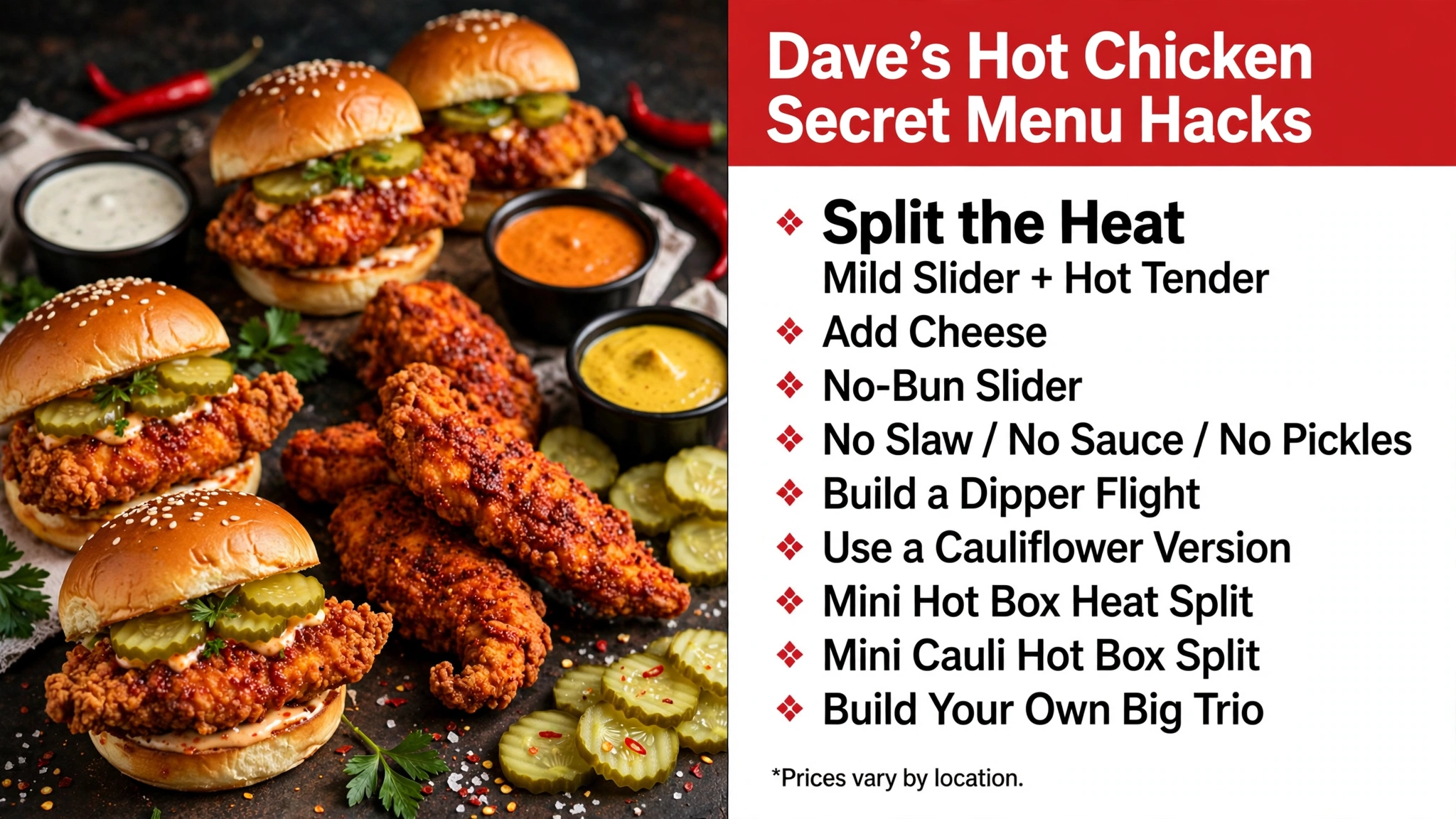
Dave’s is especially flexible for people ordering together because two items in the same meal can use different heat levels. That makes it easier to share one order across different spice preferences. For a broader chicken-price comparison, see the cheapest chicken restaurants in the USA page.
6 Heat, Slider, and Sauce Hacks
1. Split the Heat on a Two-Item Order
Dave’s ordering flow can let you choose the heat level separately for each Slider or Tender in the same order. On a two-Slider meal, for example, one Slider can stay Mild while the other goes Hot or Extra Hot. That is more useful than committing the whole meal to one spice level.
The same logic works well when two people are sharing. Each person can choose a heat level that fits them without creating two completely separate orders. Reaper carries a specific restaurant disclaimer, so treat it as a separate decision rather than simply the next ordinary step on the scale.
2. Pair a Milder Slider With a Hotter Tender
Dave’s #3 combines one Tender and one Slider with fries, and the ordering page can expose separate heat selectors for each piece. Use the Slider at a lower heat and the Tender at a higher heat, or reverse the pattern. This is one of the cleanest ways to compare how the seasoning feels across the two core formats.
Because the Slider also includes a bun, kale slaw, pickles, and Dave’s sauce, the same heat level can feel different from a bare Tender. Keeping the meal structure the same while changing only the heat makes the comparison easier.
3. Add Cheese to the Slider or Tender
Selected Dave’s product pages list Add Cheese as a paid modifier on Sliders and Tenders. This works best when you already like the standard build but want a richer finish without changing the heat level. The added charge varies by restaurant.
On a Slider, cheese works alongside the slaw, pickles, and sauce. On a Tender, the order stays simpler because the chicken is normally served with bread, pickles, and sauce rather than built as a sandwich.
4. Order a No-Bun Slider
Dave’s Slider modifier controls can include No Bun. This leaves the seasoned chicken and any remaining toppings without the potato bun. It is a simple structural change and is easier to order through the official modifier control than by trying to describe a custom plate.
Removing the bun does not automatically change every other ingredient. Slaw, sauce, pickles, and cheese remain separate choices, so review those controls individually if you want a more stripped-down order.
5. Remove Slaw, Sauce, or Pickles Separately
The standard Slider is built with kale slaw, pickles, and Dave’s sauce. Dave’s ordering system can let you remove slaw, sauce, pickles, or more than one of those components. That makes it easy to simplify the Slider while keeping the same chicken and heat level.
If you want the sauce but not directly on the Slider, remove the standard sauce and add an available dipper on the side. This gives you more control over how much sauce reaches each bite and keeps the rest of the build unchanged.
6. Build a Dipper Sauce Flight
Eligible Dave’s orders can offer extra dipper sauces such as Dave’s Sauce, Dave’s Ranch, Reaper Ranch, Spicy Buffalo, Spicy BBQ, or Hot Hot Honey, depending on the restaurant. Add two or three different dippers and keep the chicken itself at one heat level. That lets the sauce change bite by bite without buying multiple chicken orders.
This is especially useful with Tenders or Bites because the pieces are easy to dip separately. If you are comparing sauce-led chicken chains, the Popeyes secret menu and Wingstop secret menu provide useful contrasts.
4 Cauliflower and Group-Order Hacks
7. Use a Dave’s NOT Chicken Cauliflower Version
Dave’s offers cauliflower-based NOT Chicken versions in several formats, including Sliders, Tenders, Minis, and bite-style items at participating restaurants. The cauliflower Slider uses the same general sandwich structure with bun, slaw, pickles, sauce, and a selectable heat level.
Use the cauliflower version because you want that format, not because you assume it is automatically suitable for every dietary restriction. Check the exact allergen information and preparation details before relying on it for a medical or strict dietary need.
8. Split a Mini Slider Hot Box Between Two Heat Levels
The Hot Box of Minis is designed for groups, and Dave’s store menus can let you choose two heat levels for the 20 Mini Sliders. That creates an easy split for a mixed group, such as ten No Spice and ten Hot, without placing separate box orders.
The exact heat choices can be more limited on a group box than on an individual Slider. Use the options shown by the selected restaurant rather than assuming all seven heat levels are available for every Mini box configuration.
9. Do the Same With a NOT Chicken Mini Hot Box
Dave’s also lists a cauliflower Mini Slider Hot Box at participating stores. When the ordering flow allows more than one heat level, you can divide the cauliflower group order the same way as the chicken Minis. This is useful when several people want the cauliflower format but do not share one spice preference.
Group boxes are priced differently from individual Mini orders, so compare the full box with the number of people actually eating. The value comes from sharing the format, not from assuming the largest order is always cheapest.
10. Build Your Own Big Trio
The Build Your Own Big Trio lets you choose three eligible components from the restaurant’s listed selection, such as a Tender, Spicy Buffalo Mac & Cheese, Hot Mozz, Dave’s Bites, or Mini Sliders, with three dipping sauces. The exact component list can vary by restaurant, which is why it works better as a local menu hack than a fixed recipe.
Use the three slots to create contrast rather than choosing three versions of the same thing. One chicken item, one loaded side or snack, and one Mini format can turn the order into a sampler. For another multi-item chicken build, see the Jollibee secret menu.
How to Order Dave’s Secret-Menu Hacks
Dave’s custom orders are easiest when you follow the same sequence as the online ordering flow. Choose the item, select the heat, then use the modifier controls for bun, slaw, sauce, pickles, cheese, and dippers. For boxes, confirm the allowed heat split before adding other items.
- Choose the restaurant first because prices, newer items, and sauce choices can vary.
- Pick the main format: Tender, Slider, Mini Slider, Bites, cauliflower item, or Big Trio.
- Choose the heat level before adding or removing toppings.
- Use the listed modifier controls for bun, slaw, sauce, pickles, cheese, or extra dippers.
- For group boxes, confirm how many heat levels the selected item supports.
- Review the finished cart before checkout so cheese, premium sauces, and add-ons are not missed.
The official Dave’s Hot Chicken menu is the best place to confirm which modifiers the selected restaurant supports. If the goal is lower-cost chicken rather than customization, the best fast-food meals under $10 page provides broader value context.
Prices and Availability
Dave’s prices vary by restaurant and ordering channel. Cheese, extra dipper sauces, loaded sides, cauliflower items, newer bundles, and delivery fees can all change the finished total even when the base Tender or Slider price looks similar.
Use the Dave’s Hot Chicken menu with prices as the planning reference on this site, then select the restaurant you intend to use. A single Tender or Slider is easier to compare across stores than newer bundles that may not be offered everywhere.
For more restaurant-specific customization pages, browse the Secret Menus category. The exact heat splits, dips, and cauliflower formats at Dave’s should not be assumed to match another chicken chain.
Nutrition and Allergen Notes
Heat level, bun, sauce, cheese, fries, mac and cheese, and extra dippers can all change the finished nutrition profile. Removing one component changes only that part of the order, so the full meal still needs to be evaluated as a complete combination.
Dave’s publishes official nutrition and allergen information for its menu. Use the exact item and modifiers you plan to order rather than assuming a Slider, Tender, Mini, or cauliflower item has the same nutrition.
The cauliflower menu should also be checked item by item. A non-chicken main ingredient does not by itself establish whether an order fits an allergy, vegetarian, vegan, or other dietary requirement.
Frequently Asked Questions
Does Dave’s Hot Chicken have a real secret menu?
Dave’s does not advertise a separate nationwide hidden-menu board. The most reliable secret-menu-style orders use the official heat, topping, cheese, sauce, cauliflower, and group-order modifiers.
How many heat levels does Dave’s Hot Chicken have?
Dave’s ordering pages show seven levels: No Spice, Lite Mild, Mild, Medium, Hot, Extra Hot, and Reaper.
Can I choose two different heat levels in one Dave’s meal?
Yes, some multi-item meals let you choose heat separately for each Tender or Slider.
Can I add cheese to a Dave’s Slider?
Yes. Selected restaurant ordering pages list Add Cheese as a paid modifier on Sliders and some Tender orders.
Can I order a Dave’s Slider without the bun?
Yes. The Slider modifier controls can include No Bun.
Can I remove slaw, sauce, or pickles from a Dave’s Slider?
Yes. Dave’s ordering pages can offer separate controls for No Slaw, No Sauce, and No Pickles.
Can I order extra sauces at Dave’s Hot Chicken?
Yes. Participating restaurants list extra dipper sauces such as Dave’s Sauce, ranch-style sauces, buffalo, BBQ, or Hot Hot Honey.
Does Dave’s Hot Chicken have cauliflower items?
Yes. Participating restaurants offer NOT Chicken cauliflower versions in Slider, Tender, Mini, and bite-style formats.
Can a Dave’s Mini Hot Box use more than one heat level?
Some Mini Hot Boxes allow two heat levels. The exact available heat choices depend on the selected restaurant and item.
What is the Build Your Own Big Trio at Dave’s?
It is a mix-and-match order where you choose three eligible components from the restaurant’s listed selection and receive three dipping sauces.
Bottom Line
The Dave’s Hot Chicken secret menu is best understood as a modifier playbook. Split heat levels, separate Tender and Slider heat, cheese, bun and topping removals, dipper sauce flights, cauliflower versions, Mini Hot Box heat splits, and the Big Trio all use options Dave’s ordering system already recognizes.
Start with the exact item, choose the heat, then make only the changes you actually want. For more chicken customization ideas, compare the Wingstop secret menu, Zaxby’s secret menu, or browse the Secret Menus archive.