Taco Bell USA Custom Orders
Taco Bell Secret Menu
Treat the secret menu as customizable base items, Customer Creations, and app-based Fan Styles rather than a guaranteed hidden list.
Ingredients, modifier controls, charges, and preparation vary by restaurant.
Ordering method
Base + edits
Name every change clearly
Official examples
Customer Creations
Built from standard menu items
App feature
Fan Style
Build, name, and share a custom order
Final decision
Restaurant
The displayed modifiers control the order
Quick Answer
Taco Bell does not require a mysterious password or one universal hidden list. Its menu is designed for modifications, and many item pages display Customer Creations made from recognized base products. The app can also support named Fan Style orders when that feature is available to the account and restaurant.
Order by choosing a base item, applying only the modifiers shown, and reviewing the cart before payment. At the counter or drive-thru, describe each change instead of relying on a viral nickname. The Secret Menus archive uses the same practical method for other restaurant chains.
Does Taco Bell Have a Secret Menu?
Taco Bell has a highly customizable menu, but that is different from a permanent hidden catalog. The official Taco Bell menu describes tacos, burritos, quesadillas, nachos, specialties, and boxes as customizable. Individual product pages can also show Customer Creations with exact swaps, additions, and removals.
Fan Style moves the idea closer to a named custom menu. A customer can build a modified item in the Taco Bell app, give it a name, and share the order when the feature is supported. A shared name is useful inside that digital flow, but restaurant employees may still need the underlying base item and modifier list.
Deals and drink promotions remain a separate ordering intent. Check the Taco Bell Happy Hour page when the goal is to compare Happier Hour details rather than construct a custom food order. Participation and product selection depend on the restaurant.
Taco Bell Secret Menu Items at a Glance
The table uses builds that Taco Bell presents as Customer Creations on its own product pages. Read each row from left to right: choose the listed base product, apply the exact swaps or additions, and confirm the finished item in the cart. A creation may disappear when the base item or a required modifier is unavailable at the selected restaurant.
| Build | Start with | Request these changes | How Taco Bell presents it |
|---|---|---|---|
| Kickin’ Chicken Crunchwrap | Crunchwrap Supreme | Swap to slow-roasted chicken; add Creamy Jalapeño Sauce, jalapeños, pico de gallo, and potatoes; request light sour cream. | Customer Creation |
| Loaded Beef Crunchwrap | Crunchwrap Supreme | Add extra seasoned beef, Chipotle Sauce, and seasoned fries; remove tomatoes. | Customer Creation |
| Spicy Grilled Cheese Chicken Burrito | Grilled Cheese Burrito | Swap to slow-roasted chicken; add onions and jalapeño peppers. | Customer Creation |
| Steak & Fries Grilled Cheese Burrito | Grilled Cheese Burrito | Swap to steak; add seasoned fries, guacamole, and pico de gallo. | Customer Creation |
| Beefy Potato Burrito | Beefy 5-Layer Burrito | Add potatoes, pico de gallo, and Creamy Jalapeño Sauce; remove sour cream and beans. | Customer Creation |
| Steak & Rice Chipotle Burrito | Beefy 5-Layer Burrito | Swap to steak; add onions, seasoned rice, and Chipotle Sauce; remove Nacho Cheese Sauce and choose grilled. | Customer Creation |
| Double Beef and Potato Burrito | Cheesy Double Beef Burrito | Add potatoes and Creamy Jalapeño Sauce. | Customer Creation |
| Cheesy Steak Burrito | Cheesy Double Beef Burrito | Swap to steak; add onions; remove sour cream and Fiesta Strips; choose grilled. | Customer Creation |
| Beefy Cheesy Bean & Rice Burrito | Cheesy Bean and Rice Burrito | Add seasoned beef. | Customer Creation |
| Spiced Up Nachos | Nachos BellGrande | Add jalapeño peppers and guacamole. | Customer Creation |
| Extra Grande Nachos | Nachos BellGrande | Add extra seasoned beef and extra Nacho Cheese Sauce. | Customer Creation |
| Spicy Chalupa Supreme | Chalupa Supreme | Add Chipotle Sauce and jalapeño peppers. | Customer Creation |
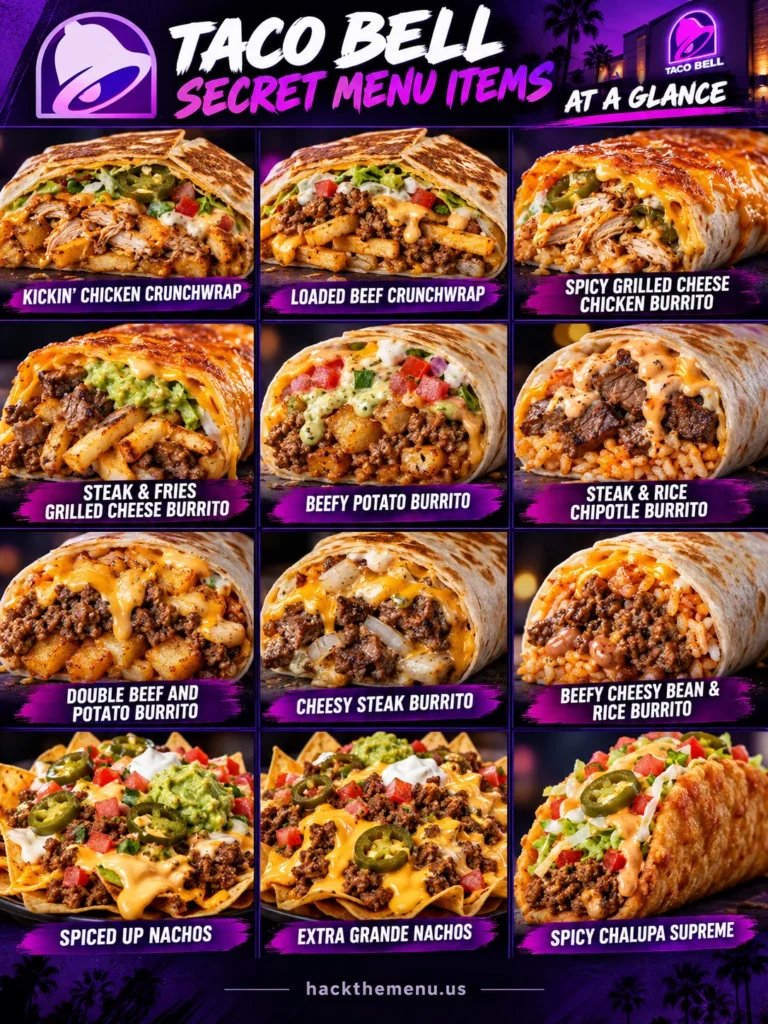
These names are more dependable than random social-media nicknames because each one is tied to a recognized base item and a defined modifier list. Even so, use the ingredient changes as the real ordering instructions. The McDonald’s custom-order page explains the same base-first approach for a chain with fewer digital modification controls.
Why Customer Creations Work Better
Customer Creations remove the biggest problem with a secret menu: an unfamiliar nickname. Taco Bell connects a name to a standard item and a defined set of edits, so the digital order can carry the full recipe. The restaurant still decides whether the selected product, ingredient, and preparation choice can be fulfilled.
This format is especially helpful for complex burritos and Crunchwraps because several ingredients can be changed at once. It also reduces the need for a team member to interpret a screenshot or memorize an internet recipe. For another restaurant that publishes its own combination ideas, compare the Chick-fil-A food hacks.
- Begin with a product displayed for the selected Taco Bell restaurant.
- Use the provided swap, add-on, removal, and preparation controls.
- Open the cart and verify every change before paying.
- Keep a complex order in the app when the counter cannot enter the same modifiers.
Crunchwrap Customizations
A Crunchwrap is a useful base because Taco Bell item pages can expose protein swaps, add-ons, sauces, and removals. Keep the tostada shell, tortilla, and folded preparation intact unless the menu offers a specific change. Too many wet sauces can soften the shell during a long delivery trip.
Kickin’ Chicken Crunchwrap
Start with a Crunchwrap Supreme and swap the seasoned beef for slow-roasted chicken. Add Creamy Jalapeño Sauce, jalapeño peppers, pico de gallo, and potatoes, then choose light sour cream. If one modifier is missing, leave it out rather than replacing it with an unrequested ingredient.
Loaded Beef Crunchwrap
Start with a Crunchwrap Supreme, add extra seasoned beef, Chipotle Sauce, and seasoned fries, then remove tomatoes. The added fries and beef make this a dense build, so verify each paid addition before checkout. Use the Taco Bell menu page to compare the base item with other specialties.
Burrito Customer Creations
Burritos support more changes than many rigid menu items because fillings can be added, removed, or swapped without changing the outer format. The app may also provide a grilled preparation choice on compatible burritos. Use the listed base instead of asking for a generic loaded burrito.
Grilled Cheese Burrito Builds
For the chicken version, swap seasoned beef for slow-roasted chicken and add onions plus jalapeño peppers. For the steak-and-fries version, swap to steak and add seasoned fries, guacamole, and pico de gallo. These are separate builds, so choose one recipe rather than combining every addition into a single order.
Beefy 5-Layer Burrito Builds
The Beefy Potato Burrito adds potatoes, pico de gallo, and Creamy Jalapeño Sauce while removing sour cream and beans. The steak-and-rice version swaps to steak, adds onions, seasoned rice, and Chipotle Sauce, removes Nacho Cheese Sauce, and uses grilled preparation. Read back the removals because they are as important as the additions.
Simple Bean and Beef Upgrades
A Cheesy Bean and Rice Burrito becomes the Beefy Cheesy Bean and Rice Burrito by adding seasoned beef. A Cheesy Double Beef Burrito can take potatoes and Creamy Jalapeño Sauce for a heavier variation. If drink customization is the main interest instead, the Starbucks custom-drink page uses an equally precise modifier-by-modifier method.
Taco, Chalupa, and Nachos Builds
Shorter recipes are easier to communicate outside the app. A Chalupa or nachos order with one or two additions is less likely to lose a modifier during a drive-thru readback. Keep sauces on the side when texture matters or when several diners are sharing.
Spicy Chalupa Supreme
Start with a Chalupa Supreme and add Chipotle Sauce plus jalapeño peppers. The base item already includes its standard fillings, so no removal is required for this creation. Ask for a sauce packet instead when the kitchen cannot apply the requested sauce.
Spiced Up or Extra Grande Nachos
For Spiced Up Nachos, begin with Nachos BellGrande and add jalapeño peppers plus guacamole. For Extra Grande Nachos, add extra seasoned beef and extra Nacho Cheese Sauce instead. Nachos soften quickly, so pickup or in-restaurant ordering may preserve the texture better than a long delivery route.
How to Order in the Taco Bell App
The app is the clearest channel for a complex Taco Bell customization because it displays the modifiers tied to the selected restaurant. Start by choosing the restaurant, then open the base item and review every available control. A modifier that does not appear should not be assumed to be available through digital ordering.
- Select the Taco Bell restaurant that will prepare the order.
- Open the exact base taco, burrito, Crunchwrap, Chalupa, or nachos item.
- Choose protein swaps, add-ons, sauces, removals, or preparation options one at a time.
- Review the item summary and confirm that each removal and addition appears.
- Check the final total because paid modifiers can change the cost.
- Save or share the creation only after the recipe is correct.
Keep deal selection separate from the custom recipe so the cart remains easy to audit. The Taco Bell deals page explains how drink pricing and participation differ from food customization. A restaurant may offer a modifier on one ordering channel but not another.
What Is Taco Bell Fan Style?
Fan Style is an app-based way to create, name, and share a customized Taco Bell item. The shared order carries the actual base product and modifications, which makes the name more useful than a nickname passed around without a recipe. Availability can depend on the app account, restaurant, item, and eligible ordering flow.
A Fan Style name does not make every ingredient permanent or nationwide. If the shared link no longer resolves or a modifier is missing, rebuild the order from the base product using the supported controls. Keep a written modifier list for any creation you want to request in person.
How to Order at the Counter or Drive-Thru
Lead with the standard item, pause, and give each change in a short sequence. State swaps first, additions second, removals third, and preparation choices last. This order helps the team member follow the register screen without decoding a recipe name.
For example: “One Beefy 5-Layer Burrito, swap the beef for steak, add onions and seasoned rice, remove Nacho Cheese Sauce, add Chipotle Sauce, and make it grilled if that option is available.” The restaurant may simplify or decline a complex request when its register cannot capture every edit. The Wendy’s customization page follows the same rule of naming the base item before the changes.
Taco Bell Secret Menu Prices
There is no single price for a custom build. The total begins with the selected restaurant’s price for the base item, then changes when paid proteins, sauces, toppings, or extra portions are added. Removing an ingredient does not guarantee a credit, and preparation choices may or may not affect the total.
Use the cart as the final price check because it shows the restaurant, item, and modifier charges together. A simpler recipe can cost less than a build with multiple proteins and premium add-ons. Comparing the unmodified base on the full Taco Bell menu makes the added cost easier to understand.
Availability and Restaurant Limits
A valid customization requires the base item and every requested ingredient to appear for the selected restaurant. Limited products, breakfast items, sauces, proteins, and side components can differ by location or ordering channel. Kiosk, app, counter, drive-thru, and delivery menus do not always expose identical controls.
- The base item is not shown for the selected restaurant.
- A required protein, sauce, topping, or side is unavailable.
- The register does not support the requested swap or removal.
- The preparation request conflicts with equipment or service procedures.
- The delivery menu removes complex modifiers or fragile products.
- A shared Fan Style link depends on an ingredient that is no longer offered there.
Accept a simpler build when one part cannot be entered. Ordering separate sides or sauces can preserve the idea without asking the kitchen to use an unsupported preparation method. Check the completed item before leaving when several removals or swaps matter.
Vegetarian, Vegan, and Fresco-Style Changes
Taco Bell provides vegetarian menu choices and lets many items replace meat with beans, black beans, or potatoes when those controls appear. Fresco Style replaces dairy ingredients and mayo-based sauces with pico de gallo on eligible items. That change can help construct a vegan-friendly order, but shared preparation areas and cross-contact still matter.
Review every ingredient after changing the protein because sauces, cheese, sour cream, and specialty components may remain. A vegetarian certification does not mean a product is vegan, and a meat removal does not create an allergen guarantee. The Chipotle custom-order page offers another way to compare bean, vegetable, and protein substitutions.
Nutrition and Allergen Checks
A custom item does not keep the same nutrition profile as its unmodified base. Extra proteins, cheese, sauces, fries, guacamole, and tortilla components can change calories, sodium, fat, carbohydrates, and allergens. Removing one ingredient may reduce exposure to that ingredient, but it does not eliminate shared equipment or kitchen cross-contact.
Review every component through Taco Bell’s official ingredient information, then ask the restaurant about preparation limits when an allergy is involved. Do not rely on a Fan Style name, a screenshot, or a standard-item nutrition line after several modifications. People with serious allergies should use the restaurant’s official information and their own medical guidance before ordering.
Viral Nicknames That Cause Confusion
Names such as Cheesarito, Superman-style burrito, Hulk-style burrito, or double-grilled item can circulate with inconsistent recipes. One source may use a different base or sauce than another, and the restaurant may not recognize the name at all. Treat the nickname as inspiration, not as a register item.
Translate any nickname into a standard base plus visible modifiers. If a requested ingredient is unavailable, do not assume the team can reproduce a discontinued product from memory. The Burger King custom-order page also separates workable modifications from names that are not official register entries.
Common Ordering Mistakes
The most common mistake is giving only a nickname and expecting the team member to know the recipe. Another is adding many paid ingredients without checking the total or nutrition impact. Complex removals can also be missed when the order is spoken too quickly.
- Do not ask for an item by nickname without naming the base product.
- Do not assume a modifier shown at one restaurant appears at every restaurant.
- Do not combine several published creations into one overloaded recipe.
- Do not expect removals to create a discount.
- Do not treat Fresco Style as an allergen or cross-contact guarantee.
- Do not submit the cart until every addition and removal appears correctly.
A short, structured recipe is easier to prepare and verify than an oversized list of edits. Save complicated combinations in the app and use simpler requests for drive-thru ordering. When the restaurant cannot support the build, choose the closest standard item instead of arguing over an internet name.
More Restaurant Customization Ideas
Different chains expose different levels of customization, so the most reliable ordering method changes with the menu and register system. Use a restaurant-specific page when comparing base products, add-ons, or drink modifications. These options keep each request tied to ingredients the selected chain can evaluate.
Taco Bell Secret Menu FAQs
Does Taco Bell have an official secret menu?
Taco Bell does not rely on one permanent hidden list. It offers customizable menu items, Customer Creations on product pages, and app-based Fan Style orders when those features and ingredients are supported.
What is Taco Bell Fan Style?
Fan Style lets eligible app users build, name, and share a customized Taco Bell item. The shared order carries the base product and modifiers, but availability still depends on the selected restaurant and ordering flow.
Can I order a Customer Creation by name?
Use the digital creation or shared link when it appears, but keep the modifier list available. At the counter or drive-thru, name the base item and every change because the employee may not recognize the creation name.
How do I make a Taco Bell burrito grilled?
Select the grilled preparation option when the item page displays it. A request for an extra grilling pass is not guaranteed, so confirm only the preparation control the restaurant can enter.
What does Fresco Style mean at Taco Bell?
Fresco Style replaces dairy ingredients and mayo-based sauces with pico de gallo on eligible products. Check the completed ingredient list because the option is not an allergen or shared-kitchen guarantee.
How much does a Taco Bell secret menu item cost?
The total combines the selected restaurant’s base-item price with any charged proteins, toppings, sauces, or extra portions. The cart or register total is the dependable price because modifier charges vary.
Can I order a secret menu build at the drive-thru?
Yes, when the restaurant can enter the base item and requested modifiers. Keep the recipe short, pause between changes, and confirm the order on the screen or through the readback.
Can Taco Bell make a discontinued item as a customization?
Do not assume so. A discontinued product may require an unavailable ingredient, preparation method, wrapper, or register entry, so order a supported base item with visible modifiers instead.
Can a Taco Bell custom order be vegetarian or vegan?
Many items can use beans, black beans, or potatoes instead of meat, and eligible items may offer Fresco Style. Review every sauce, cheese, sour cream, and specialty component, then account for shared preparation areas.
Can I order Taco Bell Customer Creations for delivery?
Only if the delivery menu shows the base item and required modifiers. Delivery platforms can expose fewer controls, and nachos or heavily sauced builds may lose texture during travel.
Ordering Notes
Choose the restaurant before building the order, use the displayed modifier controls, and review the full cart before paying. Ask for separate sauces when that makes the request easier to enter or protects the texture. This site is an independent ordering resource and is not affiliated with, endorsed by, or operated by Taco Bell.
A Customer Creation is still a customized standard product, not a promise that every restaurant has every ingredient. Keep the request respectful, accept a simpler alternative when a modifier is missing, and confirm allergy questions with Taco Bell. Clear base-item language gives both the customer and restaurant team the best chance of getting the order right.